> ## Documentation Index
> Fetch the complete documentation index at: https://phidatainc-redirect-agent-platform-overview.mintlify.site/llms.txt
> Use this file to discover all available pages before exploring further.
# Workflow Session State
> Coordinate state across workflow steps, agents, teams, and custom functions
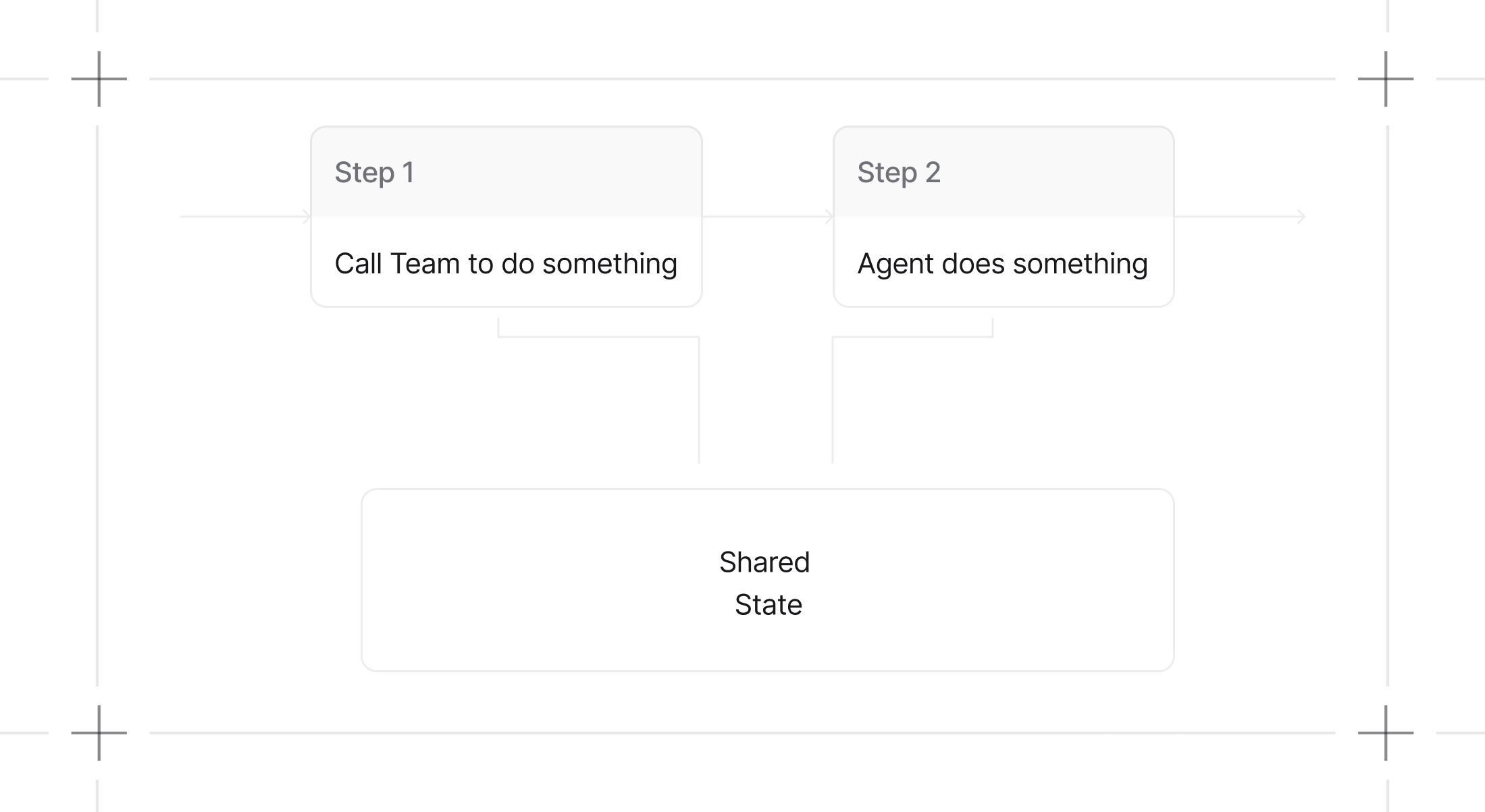
Workflow session state enables sharing and updating state data across all components within a workflow: agents, teams, and custom functions.
Session state data will be persisted if a database is available, and loaded from there in subsequent runs of the workflow.
 ## How Workflow Session State Works
### 1. State Initialization
Initialize session state when creating a workflow. The session state can start empty or with predefined data that all workflow components can access and modify.
```python theme={null}
shopping_workflow = Workflow(
name="Shopping List Workflow",
steps=[manage_items_step, view_list_step],
session_state={"shopping_list": []}, # Initialize with structured data
)
```
### 2. Access and Modify State Data
All workflow components - agents, teams, and functions - can read from and write to the shared session state. This enables persistent data flow and coordination across the entire workflow execution.
From tools, you can access the session state via `run_context.session_state`.
**Example: Shopping List Management**
```python theme={null}
from agno.agent import Agent
from agno.db.sqlite import SqliteDb
from agno.models.openai import OpenAIResponses
from agno.workflow.step import Step
from agno.workflow.workflow import Workflow
from agno.run import RunContext
db = SqliteDb(db_file="tmp/workflow.db")
# Define tools to manage a shopping list in workflow session state
def add_item(run_context: RunContext, item: str) -> str:
"""Add an item to the shopping list in workflow session state.
Args:
item (str): The item to add to the shopping list
"""
if not run_context.session_state:
run_context.session_state = {}
# Check if item already exists (case-insensitive)
existing_items = [
existing_item.lower() for existing_item in run_context.session_state["shopping_list"]
]
if item.lower() not in existing_items:
run_context.session_state["shopping_list"].append(item)
return f"Added '{item}' to the shopping list."
else:
return f"'{item}' is already in the shopping list."
def remove_item(run_context: RunContext, item: str) -> str:
"""Remove an item from the shopping list in workflow session state.
Args:
item (str): The item to remove from the shopping list
"""
if not run_context.session_state:
run_context.session_state = {}
if len(run_context.session_state["shopping_list"]) == 0:
return f"Shopping list is empty. Cannot remove '{item}'."
# Find and remove item (case-insensitive)
shopping_list = run_context.session_state["shopping_list"]
for i, existing_item in enumerate(shopping_list):
if existing_item.lower() == item.lower():
removed_item = shopping_list.pop(i)
return f"Removed '{removed_item}' from the shopping list."
return f"'{item}' not found in the shopping list."
def remove_all_items(run_context: RunContext) -> str:
"""Remove all items from the shopping list in workflow session state."""
if not run_context.session_state:
run_context.session_state = {}
run_context.session_state["shopping_list"] = []
return "Removed all items from the shopping list."
def list_items(run_context: RunContext) -> str:
"""List all items in the shopping list from workflow session state."""
if not run_context.session_state:
run_context.session_state = {}
if len(run_context.session_state["shopping_list"]) == 0:
return "Shopping list is empty."
items = run_context.session_state["shopping_list"]
items_str = "\n".join([f"- {item}" for item in items])
return f"Shopping list:\n{items_str}"
# Create agents with tools that use workflow session state
shopping_assistant = Agent(
name="Shopping Assistant",
model=OpenAIResponses(id="gpt-5.2"),
tools=[add_item, remove_item, list_items],
instructions=[
"You are a helpful shopping assistant.",
"You can help users manage their shopping list by adding, removing, and listing items.",
"Always use the provided tools to interact with the shopping list.",
"Be friendly and helpful in your responses.",
],
)
list_manager = Agent(
name="List Manager",
model=OpenAIResponses(id="gpt-5.2"),
tools=[list_items, remove_all_items],
instructions=[
"You are a list management specialist.",
"You can view the current shopping list and clear it when needed.",
"Always show the current list when asked.",
"Confirm actions clearly to the user.",
],
)
# Create steps
manage_items_step = Step(
name="manage_items",
description="Help manage shopping list items (add/remove)",
agent=shopping_assistant,
)
view_list_step = Step(
name="view_list",
description="View and manage the complete shopping list",
agent=list_manager,
)
# Create workflow with workflow_session_state
shopping_workflow = Workflow(
name="Shopping List Workflow",
db=db,
steps=[manage_items_step, view_list_step],
session_state={"shopping_list": []},
)
if __name__ == "__main__":
# Example 1: Add items to the shopping list
print("=== Example 1: Adding Items ===")
shopping_workflow.print_response(
input="Please add milk, bread, and eggs to my shopping list."
)
print("Workflow session state:", shopping_workflow.get_session_state())
# Example 2: Add more items and view list
print("\n=== Example 2: Adding More Items ===")
shopping_workflow.print_response(
input="Add apples and bananas to the list, then show me the complete list."
)
print("Workflow session state:", shopping_workflow.get_session_state())
# Example 3: Remove items
print("\n=== Example 3: Removing Items ===")
shopping_workflow.print_response(
input="Remove bread from the list and show me what's left."
)
print("Workflow session state:", shopping_workflow.get_session_state())
# Example 4: Clear the entire list
print("\n=== Example 4: Clearing List ===")
shopping_workflow.print_response(
input="Clear the entire shopping list and confirm it's empty."
)
print("Final workflow session state:", shopping_workflow.get_session_state())
```
See the [RunContext schema](/reference/run/run-context) for more information.
### 3. `run_context` as a parameter for custom python functions step in workflow
You can add the `run_context` parameter to the Python functions you use as custom steps.
The `run_context` object will be automatically injected when running the function.
You can use it to read and modify the session state, via `run_context.session_state`.
On the function of the custom python function step for a workflow
```python theme={null}
from agno.run import RunContext
def custom_function_step(step_input: StepInput, run_context: RunContext):
"""Update the workflow session state"""
run_context.session_state["test"] = test_1
```
See [examples](/state/workflows/access-session-state-in-custom-python-function-step) for more details.
The `run_context` is also available as a parameter in the evaluator and selector functions of the `Condition` and `Router` steps:
```python theme={null}
from agno.run import RunContext
def evaluator_function(step_input: StepInput, run_context: RunContext):
return run_context.session_state["test"] == "test_1"
condition_step = Condition(
name="condition_step",
evaluator=evaluator_function,
steps=[step_1, step_2],
)
```
```python theme={null}
from agno.run import RunContext
def selector_function(step_input: StepInput, run_context: RunContext):
return run_context.session_state["test"] == "test_1"
router_step = Router(
name="router_step",
selector=selector_function,
choices=[step_1, step_2],
)
```
See example of [Session State in Condition Evaluator Function](/state/workflows/access-session-state-in-condition-evaluator-function)
and [Session State in Router Selector Function](/state/workflows/access-session-state-in-router-selector-function) for more details.
## Key Benefits
**Persistent State Management**
* Data persists across all workflow steps and components
* Enables complex, stateful workflows with memory
* Supports deterministic execution with consistent state
**Cross-Component Coordination**
* Agents, teams, and functions share the same state object
* Enables sophisticated collaboration patterns
* Maintains data consistency across workflow execution
**Flexible Data Structure**
* Use any Python data structure (dictionaries, lists, objects)
* Structure data to match your workflow requirements
* Access and modify state through standard Python operations
The `run_context` object, containing the session state, is automatically passed to all agents and teams within a
workflow, enabling seamless collaboration and data sharing between different
components without manual state management.
## Useful Links
See how agents interact with shared session state
Learn how teams coordinate using shared state
## How Workflow Session State Works
### 1. State Initialization
Initialize session state when creating a workflow. The session state can start empty or with predefined data that all workflow components can access and modify.
```python theme={null}
shopping_workflow = Workflow(
name="Shopping List Workflow",
steps=[manage_items_step, view_list_step],
session_state={"shopping_list": []}, # Initialize with structured data
)
```
### 2. Access and Modify State Data
All workflow components - agents, teams, and functions - can read from and write to the shared session state. This enables persistent data flow and coordination across the entire workflow execution.
From tools, you can access the session state via `run_context.session_state`.
**Example: Shopping List Management**
```python theme={null}
from agno.agent import Agent
from agno.db.sqlite import SqliteDb
from agno.models.openai import OpenAIResponses
from agno.workflow.step import Step
from agno.workflow.workflow import Workflow
from agno.run import RunContext
db = SqliteDb(db_file="tmp/workflow.db")
# Define tools to manage a shopping list in workflow session state
def add_item(run_context: RunContext, item: str) -> str:
"""Add an item to the shopping list in workflow session state.
Args:
item (str): The item to add to the shopping list
"""
if not run_context.session_state:
run_context.session_state = {}
# Check if item already exists (case-insensitive)
existing_items = [
existing_item.lower() for existing_item in run_context.session_state["shopping_list"]
]
if item.lower() not in existing_items:
run_context.session_state["shopping_list"].append(item)
return f"Added '{item}' to the shopping list."
else:
return f"'{item}' is already in the shopping list."
def remove_item(run_context: RunContext, item: str) -> str:
"""Remove an item from the shopping list in workflow session state.
Args:
item (str): The item to remove from the shopping list
"""
if not run_context.session_state:
run_context.session_state = {}
if len(run_context.session_state["shopping_list"]) == 0:
return f"Shopping list is empty. Cannot remove '{item}'."
# Find and remove item (case-insensitive)
shopping_list = run_context.session_state["shopping_list"]
for i, existing_item in enumerate(shopping_list):
if existing_item.lower() == item.lower():
removed_item = shopping_list.pop(i)
return f"Removed '{removed_item}' from the shopping list."
return f"'{item}' not found in the shopping list."
def remove_all_items(run_context: RunContext) -> str:
"""Remove all items from the shopping list in workflow session state."""
if not run_context.session_state:
run_context.session_state = {}
run_context.session_state["shopping_list"] = []
return "Removed all items from the shopping list."
def list_items(run_context: RunContext) -> str:
"""List all items in the shopping list from workflow session state."""
if not run_context.session_state:
run_context.session_state = {}
if len(run_context.session_state["shopping_list"]) == 0:
return "Shopping list is empty."
items = run_context.session_state["shopping_list"]
items_str = "\n".join([f"- {item}" for item in items])
return f"Shopping list:\n{items_str}"
# Create agents with tools that use workflow session state
shopping_assistant = Agent(
name="Shopping Assistant",
model=OpenAIResponses(id="gpt-5.2"),
tools=[add_item, remove_item, list_items],
instructions=[
"You are a helpful shopping assistant.",
"You can help users manage their shopping list by adding, removing, and listing items.",
"Always use the provided tools to interact with the shopping list.",
"Be friendly and helpful in your responses.",
],
)
list_manager = Agent(
name="List Manager",
model=OpenAIResponses(id="gpt-5.2"),
tools=[list_items, remove_all_items],
instructions=[
"You are a list management specialist.",
"You can view the current shopping list and clear it when needed.",
"Always show the current list when asked.",
"Confirm actions clearly to the user.",
],
)
# Create steps
manage_items_step = Step(
name="manage_items",
description="Help manage shopping list items (add/remove)",
agent=shopping_assistant,
)
view_list_step = Step(
name="view_list",
description="View and manage the complete shopping list",
agent=list_manager,
)
# Create workflow with workflow_session_state
shopping_workflow = Workflow(
name="Shopping List Workflow",
db=db,
steps=[manage_items_step, view_list_step],
session_state={"shopping_list": []},
)
if __name__ == "__main__":
# Example 1: Add items to the shopping list
print("=== Example 1: Adding Items ===")
shopping_workflow.print_response(
input="Please add milk, bread, and eggs to my shopping list."
)
print("Workflow session state:", shopping_workflow.get_session_state())
# Example 2: Add more items and view list
print("\n=== Example 2: Adding More Items ===")
shopping_workflow.print_response(
input="Add apples and bananas to the list, then show me the complete list."
)
print("Workflow session state:", shopping_workflow.get_session_state())
# Example 3: Remove items
print("\n=== Example 3: Removing Items ===")
shopping_workflow.print_response(
input="Remove bread from the list and show me what's left."
)
print("Workflow session state:", shopping_workflow.get_session_state())
# Example 4: Clear the entire list
print("\n=== Example 4: Clearing List ===")
shopping_workflow.print_response(
input="Clear the entire shopping list and confirm it's empty."
)
print("Final workflow session state:", shopping_workflow.get_session_state())
```
See the [RunContext schema](/reference/run/run-context) for more information.
### 3. `run_context` as a parameter for custom python functions step in workflow
You can add the `run_context` parameter to the Python functions you use as custom steps.
The `run_context` object will be automatically injected when running the function.
You can use it to read and modify the session state, via `run_context.session_state`.
On the function of the custom python function step for a workflow
```python theme={null}
from agno.run import RunContext
def custom_function_step(step_input: StepInput, run_context: RunContext):
"""Update the workflow session state"""
run_context.session_state["test"] = test_1
```
See [examples](/state/workflows/access-session-state-in-custom-python-function-step) for more details.
The `run_context` is also available as a parameter in the evaluator and selector functions of the `Condition` and `Router` steps:
```python theme={null}
from agno.run import RunContext
def evaluator_function(step_input: StepInput, run_context: RunContext):
return run_context.session_state["test"] == "test_1"
condition_step = Condition(
name="condition_step",
evaluator=evaluator_function,
steps=[step_1, step_2],
)
```
```python theme={null}
from agno.run import RunContext
def selector_function(step_input: StepInput, run_context: RunContext):
return run_context.session_state["test"] == "test_1"
router_step = Router(
name="router_step",
selector=selector_function,
choices=[step_1, step_2],
)
```
See example of [Session State in Condition Evaluator Function](/state/workflows/access-session-state-in-condition-evaluator-function)
and [Session State in Router Selector Function](/state/workflows/access-session-state-in-router-selector-function) for more details.
## Key Benefits
**Persistent State Management**
* Data persists across all workflow steps and components
* Enables complex, stateful workflows with memory
* Supports deterministic execution with consistent state
**Cross-Component Coordination**
* Agents, teams, and functions share the same state object
* Enables sophisticated collaboration patterns
* Maintains data consistency across workflow execution
**Flexible Data Structure**
* Use any Python data structure (dictionaries, lists, objects)
* Structure data to match your workflow requirements
* Access and modify state through standard Python operations
The `run_context` object, containing the session state, is automatically passed to all agents and teams within a
workflow, enabling seamless collaboration and data sharing between different
components without manual state management.
## Useful Links
See how agents interact with shared session state
Learn how teams coordinate using shared state